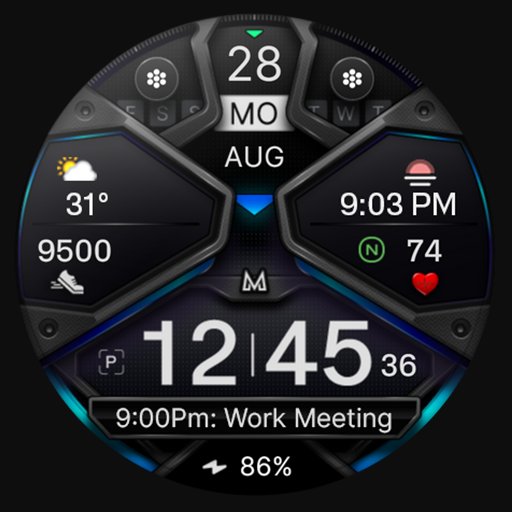
MD326 3D Modern Watch Face

MD326 3D Modern Watch Face

Screenshots

Description

Note for Galaxy Watch Users: The watch face editor in the Samsung Wearable app often fails to load complex watch faces like this one.
This is not an issue with the watch face itself.

It is recommended to customize the watch face directly on the watch until Samsung resolves this issue.

TAP AND HOLD SCREEN ON WATCH AND SELECT CUSTOMIZE.


It contains 3 Preset App shortcuts, 2 customizable shortcuts, 3 customizable complications where you can have the data you prefer like weather, barometer, uv index, chanche of rain etc.

INSTALLATION NOTES:

Please check this link for installation and troubleshooting guide:
https://www.matteodinimd.com/watchface-installation/

This watch face supports all Wear OS devices with API Level 33+ (Wear OS 4 and later versions) like Samsung Galaxy Watch 4-8, Ultra, Pixel Watch etc.

Features:

- 12/24hr based on phone settings
- Date
- Day
- Month
- Battery
- Steps
- Heart Rate + Intervals
- 3 Preset app shortcuts
- 2 customizable shortcuts
- 3 customizable complications
- Always ON Display with optional mimimal style
- Hideable hands
- Changeable colors of time, bezel, background and general colors.

Customization:

1 - Touch and hold display
2 - Tap on customize option

Preset APP Shortcuts:

- Calendar
- Battery
- Measure Heart Rate

Complications:

you can customize the watch face with the any data you want.

For example, you can select weather, world clock, barometer etc.

**some features may not be available on some watches.


Let's keep in touch:

Newsletter:
Sign up to stay updated with new watchfaces and promotions!
http://eepurl.com/hlRcvf

FACEBOOK:
https://www.facebook.com/matteodiniwatchfaces

INSTAGRAM:
https://www.instagram.com/mdwatchfaces/

TELEGRAM:
https://t.me/mdwatchfaces

WEB:
https://www.matteodinimd.com

Thank you.

Developer

Recent Reviews

Martin Pearson

v10.0.5

samsung complication for heartrate does not reliably stay up to date on the watch face. Have to tap it and go to the app for it to update.

Apr 16, 2026

H. H.

v10.0.5

I'm highly disappointed in this app. I purchased this on March 18th and it still has not been installed on my watch. I've reached out to the company via email and only received a vague response. I want a refund immediately. ZERO STARS.

Mar 30, 2026

Andy M.

v10.0.5

I keep coming back to this one. it's cheerful 😁

Developer Response

Thank you ! 😊 Best, MD watch faces

Mar 29, 2026

Mar 29, 2026

Mark Cain

v10.0.5

Won't install

Mar 29, 2026

Rodolfo Ferreira

v5.0.25

It's kind of cool but that's about it as it gets boring to look at rather quickly, and there's no 24 hour option for it and the “no phone connected“ icon will stay on top of the date makes me think it's not worth the price.

Developer Response

The 24-hour format is controlled by your watch system settings, not by the watch face. Please change the time format directly in your device settings. Also, the “no phone connected” icon is a standard Wear OS system indicator. You can remove it by adjusting the connection or notification settings on your watch. Best, MD watch faces

Mar 18, 2026

Mar 17, 2026

Get API Access to 1.5 Million Apps

Access complete app metadata, rankings, reviews, and screenshots for your product and market intelligence workflows.